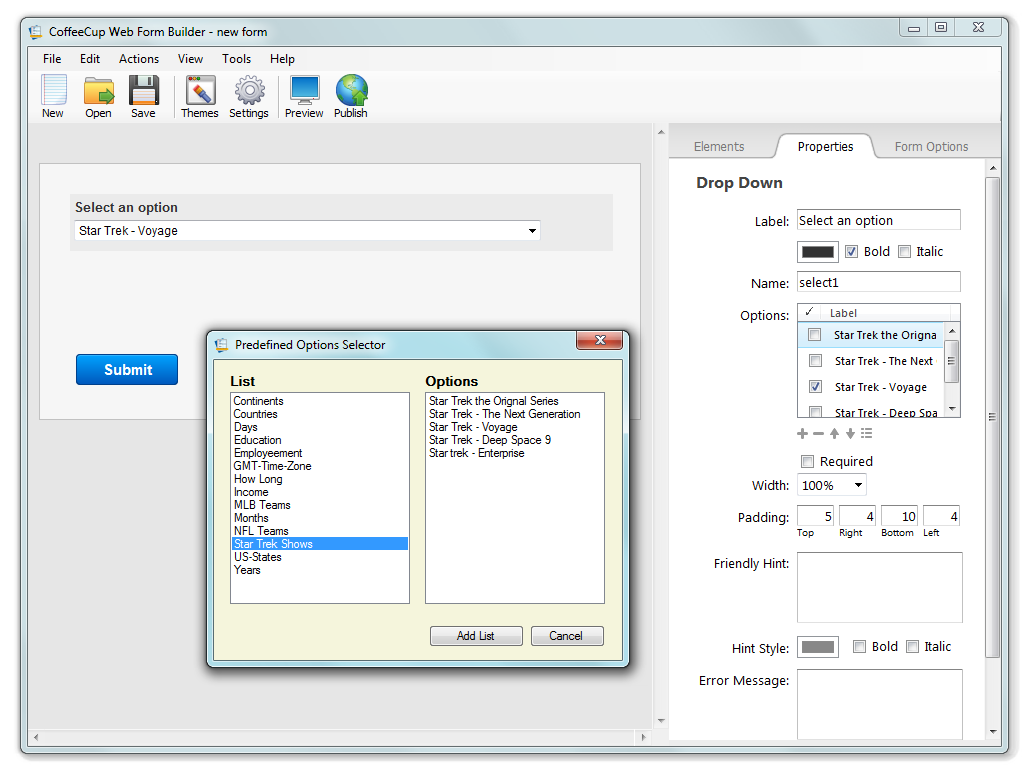
Many of you may not know this, but there is a hidden feature in Web Form Builder that allows you to create your own custom options lists. These predefined lists are used for Checkboxes, Radio Buttons, and Drop Down lists.
To access these lists, go to one of these locations:
Windows XP:
C:\Documents and Settings[NAME]\My Documents\CoffeeCup Software\Web Form Builder\options-list
Windows Vista / 7:
C:\Users[NAME]\Documents\CoffeeCup Software\Web Form Builder\options-list
To make your own lists, open Notepad and create a new document. In the new document, put each list item on its own single line of text. You can use spaces to separate items, but you cannot use tabs. Also, if you intend to use any non-English character sets, make sure to use the HTML entity (instead of ø write ø) Open one of the existing options lists within the folder for reference.

So do you think you have what it takes to make a good options list? If so, share it with everyone here.
~_~_~_~_~_~_~_~_~_~_~_~_~_~_~_~
Scott A. Swedorski - VP of Product Development
CoffeeCup Software Inc.
Phone: 678.495.3480
Here are two for sports teams.
~_~_~_~_~_~_~_~_~_~_~_~_~_~_~_~
Scott A. Swedorski - VP of Product Development
CoffeeCup Software Inc.
Phone: 678.495.3480
Here are 3 more:
Continents, Education and Employment
~_~_~_~_~_~_~_~_~_~_~_~_~_~_~_~
Scott A. Swedorski - VP of Product Development
CoffeeCup Software Inc.
Phone: 678.495.3480
Here are 3 more:
How Long, Income and my favorite, all Star Trek shows.
~_~_~_~_~_~_~_~_~_~_~_~_~_~_~_~
Scott A. Swedorski - VP of Product Development
CoffeeCup Software Inc.
Phone: 678.495.3480
Colors & Shoe Sizes:
Jo Ann
http://lbwebsites.com - Affordable Web Design & Hosting
http://cattownrescue.org ... Love this site! Love cats! This site was definitely fun to do 
http://northbaldwinliteracycouncil.org .... Our local Literacy Council
Days of the week in German.
I created a list of the days of the week in Norwegian, but the list showed up as empty because of 'lørdag' and 'søndag'. The culprit seems to be the letter 'ø'. As soon as I removed those two, the rest of the days showed up. I also tried writing the ø the Swedish way, 'ö', but that made the list not work again.
This has to be fixed, or this option list creation will be of no use to most of Europe and the whole of S America, and I don't know who else...
Ha en riktig god dag!
Inger, Norway
http://www.eikweb.com
http://www.horgenhonning.net/
http://www.norwayroots.com
http://www.johnsflats.com
Inger Eik wrote:
Days of the week in German.
I created a list of the days of the week in Norwegian, but the list showed up as empty because of 'lørdag' and 'søndag'. The culprit seems to be the letter 'ø'. As soon as I removed those two, the rest of the days showed up. I also tried writing the ø the Swedish way, 'ö', but that made the list not work again.
This has to be fixed, or this option list creation will be of no use to most of Europe and the whole of S America, and I don't know who else...
I actually ran into that today myself and I have it logged for a fix in the next update.
~_~_~_~_~_~_~_~_~_~_~_~_~_~_~_~
Scott A. Swedorski - VP of Product Development
CoffeeCup Software Inc.
Phone: 678.495.3480
Right. I found my way to a solution. Instead of ø I wrote ø and that worked. Same with ö for ö. So herewith the days of the week in Norwegian.
Now my guess is, that there won't be too many of the users here who need Norwegian, but my reason for posting this list is that someone whose language is not English, may find my work-around useful - at least until CC comes up with a fix.

Those who know html and the entities for the special characters for the language they want to use, can do the same as I did, but I guess there are a whale of users who have no clue about html. So there is still a need for a fix.
Ha en riktig god dag!
Inger, Norway
http://www.eikweb.com
http://www.horgenhonning.net/
http://www.norwayroots.com
http://www.johnsflats.com
Inger Eik wrote:
Days of the week in German.
I created a list of the days of the week in Norwegian, but the list showed up as empty because of 'lørdag' and 'søndag'. The culprit seems to be the letter 'ø'. As soon as I removed those two, the rest of the days showed up. I also tried writing the ø the Swedish way, 'ö', but that made the list not work again.
This has to be fixed, or this option list creation will be of no use to most of Europe and the whole of S America, and I don't know who else...
And I agree!
(thank you Inger, for remembering our 'ö' !

...and thank you Scott, for taking this recurring issue seriously!
- I hope the fix really
will show up in the next update!

)
Per
www.mingas.com