
Website Access Manager5.0
Free
Release: Jul 8, 2015 | Windows : 10, 8, 7, Vista
Free
Release: Jul 8, 2015 | Windows : 10, 8, 7, Vista

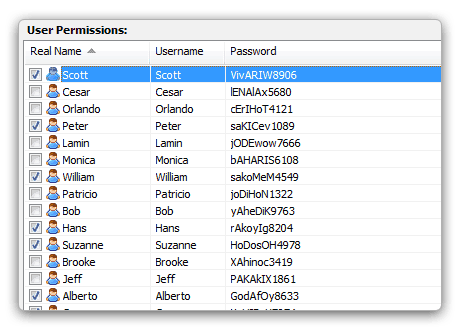
There are a ton of reasons to create members-only areas of your website. It puts you in control — control over who sees your family photos, who gets to see the special products and discounts in your online store, and the list goes on and on.
When you password protect your website with Website Access Manager, you’ve got some serious muscle on your side. Want your visitors to have to sign in to see your whole website, from the front page all the way down? We’ve got you covered. Same goes for specific areas of your site, or even individual webpages and files like images or MP3s. Website Access Manager is a full-featured .htaccess generator — a high-tech solution that protects your website and keeps unwanted visitors out.

With Website Access Manager, you can have an unlimited number of users. Yeah, we said unlimited. If you’re password protecting a family photo album, you can create user profiles for everyone in your family, from all your little cousins to your crazy aunt Mildred. If you want people to sign in to access your demo MP3s, you can create enough usernames and passwords for your friends, your manager, and your throngs of adoring fans.
Better yet, user profiles can contain as much or as little information as you need. There are the basics — a username and password — plus detailed information, like a phone number, website, e-mail address, time zone, preferred language, and pretty much anything else you might need to know. This information is stored securely on your computer and makes keeping track of your user base a whole lot easier.

We’ve all seen more than our fair share of ugly error pages. You know the kind — plain text with a pixelated graphic or two that says nothing about how the user got there and doesn’t give them a way out. Does it keep you up at night knowing your users might see a page like that while visiting your website? Well, you can rest easy knowing that Website Access Manager lets you redirect 404 errors and other bad requests to a custom error page you’ve designed in a program like Visual Site Designer or the HTML Editor. Or even better, you could pick up one of the cool error page themes in our Theme Store! They're clever, they're witty, and they're sure to make the at-times frustrating experience of clicking a bad link more pleasant for your visitors. Complete control over all aspects of your website — not too shabby.

You have to rename some files or reorganize your file structure. It just comes with the territory… and it comes with the risk of your users getting lost. Let’s say you have a forum called “Talkin’ About Current Events,” but you want to change the name and corresponding hyperlink to “Current Events Talk.” All your users who have “Talkin’ About Current Events” bookmarked are going to get a big, fat error page the next time they visit that link — unless you use Website Access Manager’s nifty browser redirection tool to automatically take them to the new location.
This feature also comes in handy if you’ve designed a site that’s optimized for mobile devices. The best way to make sure your mobile users are actually accessing this version of the site is browser redirection — which you can do with ease, courtesy of Website Access Manager.

Keep in Touch: Website Access Manager comes with a nifty function that lets you send e-mail to your users right from inside the program. It also comes with predefined e-mail templates that make it easy to send out e-mails with lost logins, expired account warnings, and new passwords.

Block Users by IP Address or Domain: Spammers and bad bots flooding your website? No worries — Website Access Manager lets you block users by IP address or domain name. This protection is airtight, meaning spammers and hackers will be out of your hair.

Intuitive Interface: The Website Access Manager workspace is intuitive and easily customizable, which means you can enable password protection quickly while keeping an eye only on the information you need to know. But behind the scenes, this powerful .htaccess generator is working hard to protect your website.

Import Existing Information: If you’re already working with CoffeeCup Password Wizard or a CSV file, Website Access Manager can import your existing user profiles. This time-saving option makes it easy for you to password protect your website quickly, with no muss or fuss and without the aggravation of reentering your information from scratch.

Built-in Compatibility Check: Website Access Manager is powered by .htaccess files, which work only with Apache and Apache-compatible servers. Not sure what kind of server you have? The program comes with a handy tool that checks your server to make sure it's compatible.

Back up Your Work: You never know when you might need a backup of your work — especially something as important as your user profiles and password protection settings. With the built-in backup tool, you’ll be able to keep your work safe with a click of your mouse.

Protect Your Content: Let’s say somebody’s using your images or video without your permission. That’s a pretty serious problem; Website Access Manager offers a pretty convenient solution. Introducing Hotlink Protection, which keeps other websites from using the images, videos, or other static content served on your website on their pages.

Keep Things Standard: Web design can get messy, and sometimes the settings on your pages end up being different — like your default language and character set. You could go through and edit each and every one of your HTML pages (yuck), or you could save yourself a bunch of work and set these options in Website Access Manager.