I am growing old & grey trying to sort this small but irritating problem

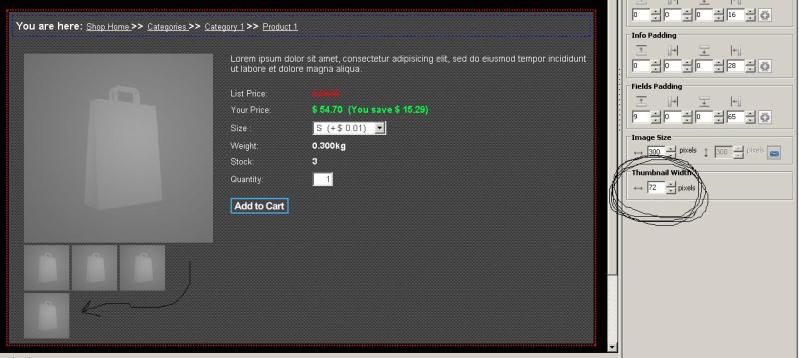
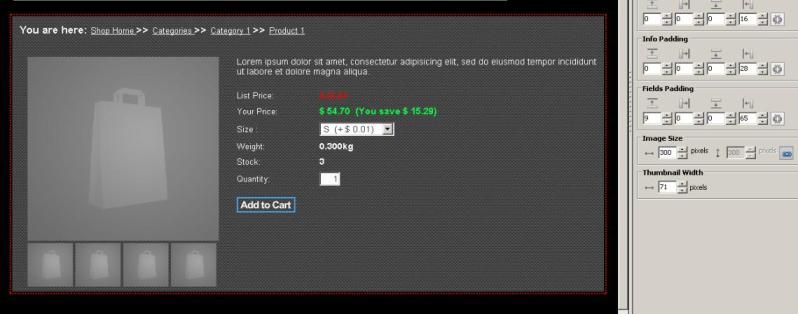
In product detail properties I am trying to line up the thumbnail images with the product image (300 pixel). Problem is when the thumbnails are 71 pixels they are not the same width as the product image and if I make them 72 pixels wide they wrap down and stack 3 on top and 2 below ??.
I have tried adjusting the width of the product image but it seems no matter what size I use this wrapping effect happens, I just cant seem to get a happy medium. The screenshots are a little small to see the details (sorry) but the bottom one shows the thumbnails at 71 pixels and the top one shows what happens when they are adjusted to 72 pixels. If you look at the bottom screenshot you will see the thumbnails are not the same width as the product picture.


Any ideas ???
Phil
Make the main image size larger.
I can't hear what I'm looking at when it's so easy to overlook something I'm not looking for.
Here's my S-Drive site with
examples of what can be accomplished in VSD.
http://progrower.coffeecup.com/
Here's my CoffeeCup SCCP Shop with examples of what can be done.
http://progrower.coffeecup.com/shop/
Eric
Thanks for your reply. This is the frustrating thing; no matter how large the product image is the thumbnail images wrap exactly they get to the desired distance apart, For example if the product image is 400 pixels when the combined width of the thumbnails gets to 399 pixels the 400th pixel adjustment causes them to wrap, they never ever hit the same dimension as the main image.
It does not make the slightest difference whether the product image is 300, 319, 400 or 500 pixels the thumbnail images always wrap when the correct distance is met. I believe it is a conspiracy by CC developers to drive me over the edge

Phil
I tested and If I made the main image 350 It would then allow me to make the bottom images 82 wide before they would wrap.
I can't hear what I'm looking at when it's so easy to overlook something I'm not looking for.
Here's my S-Drive site with
examples of what can be accomplished in VSD.
http://progrower.coffeecup.com/
Here's my CoffeeCup SCCP Shop with examples of what can be done.
http://progrower.coffeecup.com/shop/
Eric
Yes, you are quite right. I actually got to 83 with the main image at 350

. However to line up they need to be 84 and as soon as that adjustment from 83 to 84 is made BINGO down that last thumbnail goes


. All I want is for the outer edges of the thumbnails to line up with the outer edges of the main image. How I wish I could put in a guide to snap them to.
I think I am just going to have to accept I will never get them lined up correctly.
I would love to know why this phenomenon exists, is it mathematical maybe ?. Thanks for taking the time to look anyhow.
Phil
I see your looking to get those flush with the right hand side. I bet you could hard code some images into your page over this area.
I can't hear what I'm looking at when it's so easy to overlook something I'm not looking for.
Here's my S-Drive site with
examples of what can be accomplished in VSD.
http://progrower.coffeecup.com/
Here's my CoffeeCup SCCP Shop with examples of what can be done.
http://progrower.coffeecup.com/shop/
Eric
I'm sure that would be possible. Sometimes though you have to recognize your limits

and delving into the coding is not my forte I'm afraid.
Have I found a 'Bug'

Phil
Titus wrote:Have I found a 'Bug'

Maybe not so-much of a bug, as a feature need...
I think that what is being overlooked, is the space between the thumbnails, for which we don't seem to have any control. One thing I did think of, but haven't had the chance to check on, is - If you go to SCC (PRO) and only use 2 of the 4 thumbnails, how does it display? Can you add more than 4 thumbnails to a product? And if so, how does it handle that situation? I'm wondering if an option to set the thumbnails (as we do text) as Left/Right/Center or Full Justification and be automatic no matter how many you insert.
Hmmm... So now I have something to play with while I wait for the post office to open this morning.
Living the dream, stocking the cream
Phil
I think you only have the 4 thumbnails. I'm sure I have seen a post here somewhere where the guy wanted more to display different colours of a product. The answer was to have the colour options in drop down menu and that we were stuck with 4 thumbs.
Phil
Titus wrote:
...answer was to have the colour options in drop down menu and that we were stuck with 4 thumbs....
Sounds to me like we are getting awfully close to being
ALL thumbs...
Per
www.mingas.com